Real Time Monitor
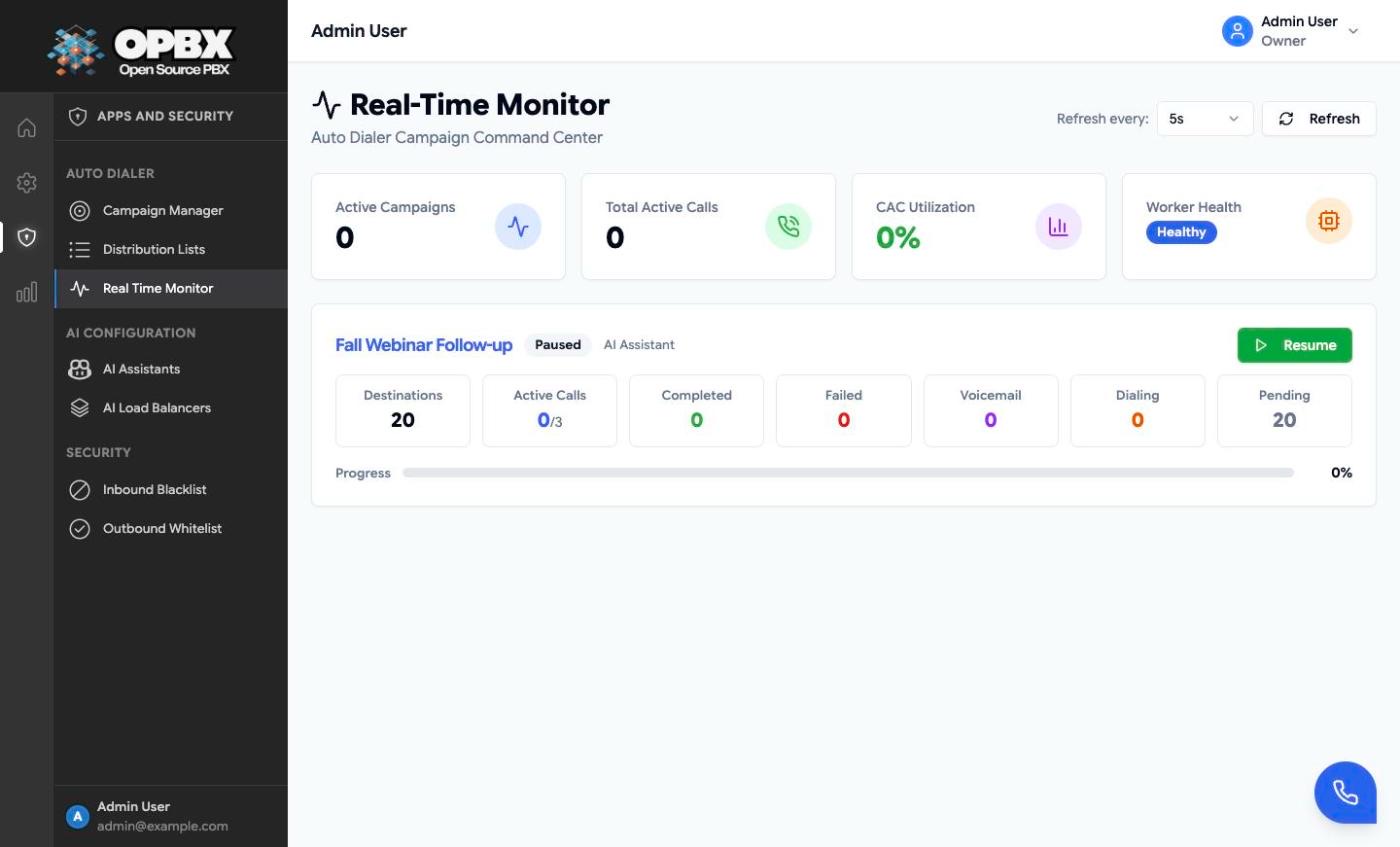
The Real Time Monitor is the Auto Dialer's command center. It shows every Active and Paused campaign with live counters, and lets you drill into one campaign to see its calls in progress and how calls ended.
Purpose
Use the monitor while a campaign runs to check that it dials, that it stays within its limits, and that the dialer worker is healthy. Pause or resume a campaign from here.
Prerequisites
- You are the Owner, a PBX Admin or a Reporter. Only the Owner and PBX Admins can pause and resume campaigns; a Reporter sees the monitor without the Pause and Resume buttons.
- For the Worker Health card, OPBX calls the dialer worker's health address,
DIALER_WORKER_HEALTH_URLin.env(defaulthttp://dialer-worker:8081/webhooks/health). When it is set to an empty value the card shows unknown.
Open the monitor
Who can do this: Owner, PBX Admin and Reporter.
- Open Auto Dialer → Real Time Monitor.
Result: the Real-Time Monitor page ("Auto Dialer Campaign Command Center") shows the summary cards and one card per Active or Paused campaign. Draft, Completed and Archived campaigns are not shown. With no Active or Paused campaign, the page says "No active campaigns" and offers Go to Campaigns.
Change the refresh interval
Who can do this: anyone who can open the monitor.
- In the header, open the refresh picker and choose Manual, 1s, 5s, 10s (default), 20s, 30s, 40s, 50s or 60s.
- With Manual, click the refresh button next to the picker whenever you want new numbers.
Result: the overview and the drill-down reload at the chosen interval. Your choice is remembered in this browser. Polling stops while the browser tab is hidden and resumes when you come back.
The server caches the overview for 5 seconds and a campaign's statistics for 10 seconds, so faster settings mostly show the same numbers.
Overview
Summary cards
| Card | Meaning |
|---|---|
| Active Campaigns | Campaigns in Active status (paused ones are shown as cards but not counted here) |
| Total Active Calls | Calls in progress across them |
| CAC Utilization | Calls in progress as a share of the campaigns' combined CAC limits |
| Worker Health | The dialer worker's own health report: healthy, unknown (no health address configured) or offline (no answer within 5 seconds) |
Campaign cards
One card per campaign:
- Header: name, status, routing destination, and, for the Owner and PBX Admins, a Pause (Active) or Resume (Paused) button.
- Counters: Destinations, Active Calls (shown as active/CAC limit), Completed, Failed, Voicemail, Dialing, Pending.
- Footer: a progress bar.
A Paused campaign always shows 0 active calls.
A scheduled job (every minute) corrects stuck numbers of Active and Paused campaigns: a number left in Dialing for more than 5 minutes (or any Dialing number of a paused campaign) goes back to Pending, or to Failed when it has no attempts left; a pending number with no attempts left becomes Failed. The monitor shows the result on its next refresh.
Drill-down
Who can do this: anyone who can open the monitor.
- Click a campaign card (anywhere except its Pause or Resume button).
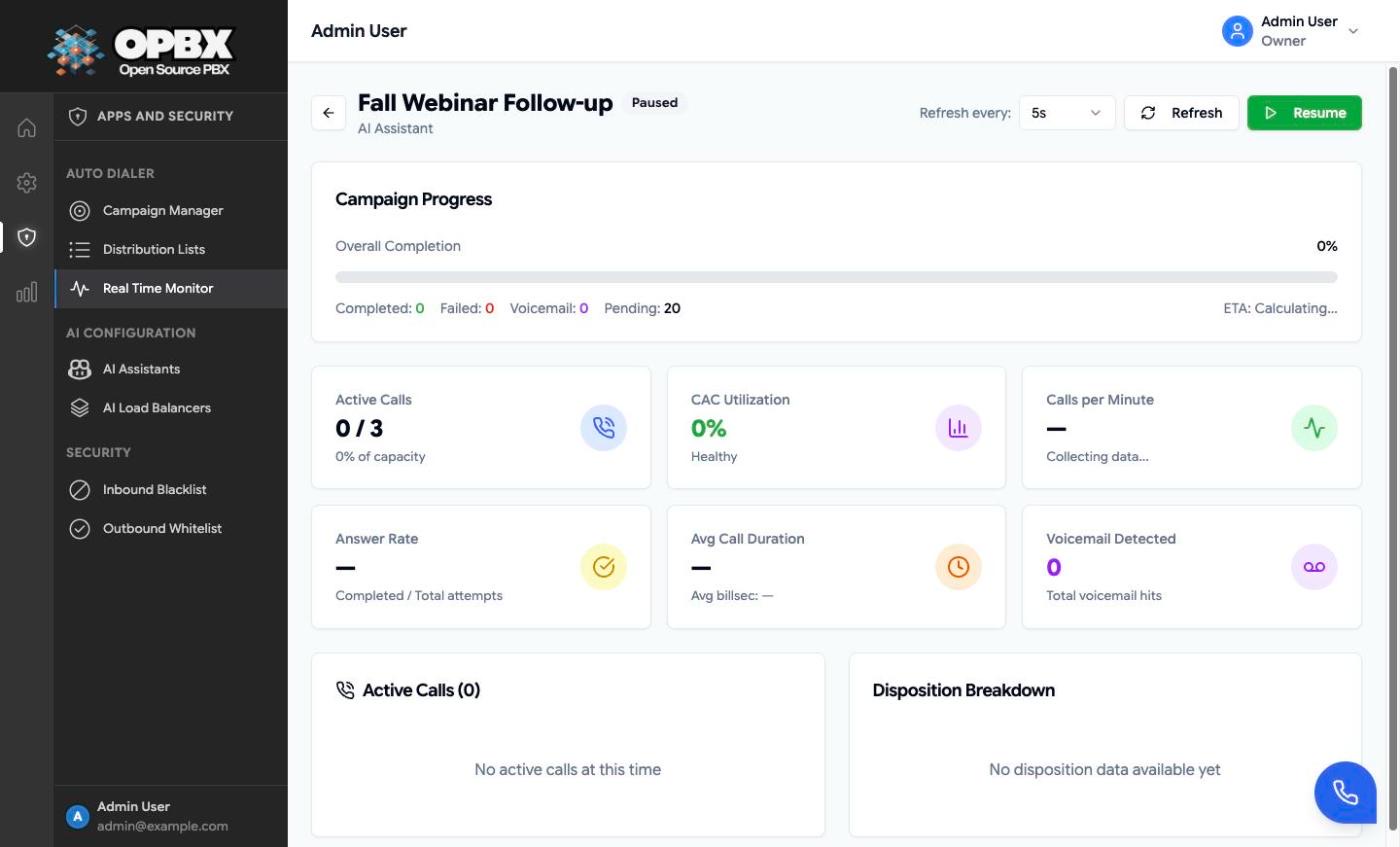
Result: the drill-down for that campaign opens, with its name, status and routing destination in the header, the refresh picker and, for the Owner and PBX Admins, the Pause or Resume button. The back arrow returns to the overview.
| Section | Content |
|---|---|
| Campaign Progress | Overall completion with the completed, failed, voicemail and pending counts, and an ETA (pending numbers divided by the calls-per-minute rate; "Calculating..." until a rate is known) |
| Active Calls | Calls in progress against the CAC limit |
| CAC Utilization | Active calls as a share of CAC, labelled Healthy (under 50 %), Moderate (under 80 %) or High |
| Calls per Minute | Calls started per minute, measured between refreshes in your browser (empty until two refreshes have passed) |
| Answer Rate | Completed calls divided by all attempts |
| Avg Call Duration | Average length of connected calls |
| Voicemail Detected | Calls where voicemail detection heard a beep |
| Active Calls (n) table | Phone number, status and duration of each call started in the last 5 minutes and still in progress ("No active calls at this time" when empty) |
| Disposition Breakdown | A chart of how calls ended: Answered, Completed, Busy, No Answer, Failed, Cancelled, Congestion |
Pause and resume from the monitor
Who can do this: Owner and PBX Admin. The buttons are hidden from Reporters.
- Click Pause (on an Active campaign) or Resume (on a Paused one), on the campaign card or in the drill-down header. There is no confirmation dialog.
Result: the toast "Campaign "name" paused" (or "… resumed") appears and the card's status and button change. The effect is the same as on the Campaign Manager: see Start, pause, resume.
Reading the monitor
| What you see | What it usually means | What to do |
|---|---|---|
| Active Calls stays at the CAC limit | The destination is the bottleneck, or calls are long | Raise CAC only if the assistant can take more calls |
| Running, 0 active calls, pending numbers left | Outside the schedule window, or numbers are waiting for their retry time | Check the schedule |
| Running, 0 pending, 0 active calls | The list is finished | The campaign switches to Completed within a minute; archive it if you like (see Campaign Manager) |
| Many Failed quickly | Calls are being refused (caller ID, trunk) or the destination is missing | Check Call Logs and the routing |
| Worker Health offline | The dialer worker is down | Check the worker. See Dialer Worker |