Rate Limiting (CAC and CPS)
Two limits control how hard a campaign dials. CAC (concurrent active calls) caps how many of its calls may be in progress at once. CPS (calls per second) caps how fast new calls are started. Max Dial Attempts caps how often one number is tried.
Purpose
Use these limits to match the campaign to what its destination can take: an AI assistant that handles five simultaneous conversations should not receive twenty, and a carrier may limit how fast you start calls.
Prerequisites
- A campaign in Draft or Paused status. The limits are on the Advanced tab of the campaign form. See Campaign Manager.
Set the rate limits
Who can do this: Owner and PBX Admin.
- Open Auto Dialer → Campaign Manager. Pause the campaign if it is Running.
- Click Edit on the campaign (or Create Campaign for a new one) and select the Advanced tab.
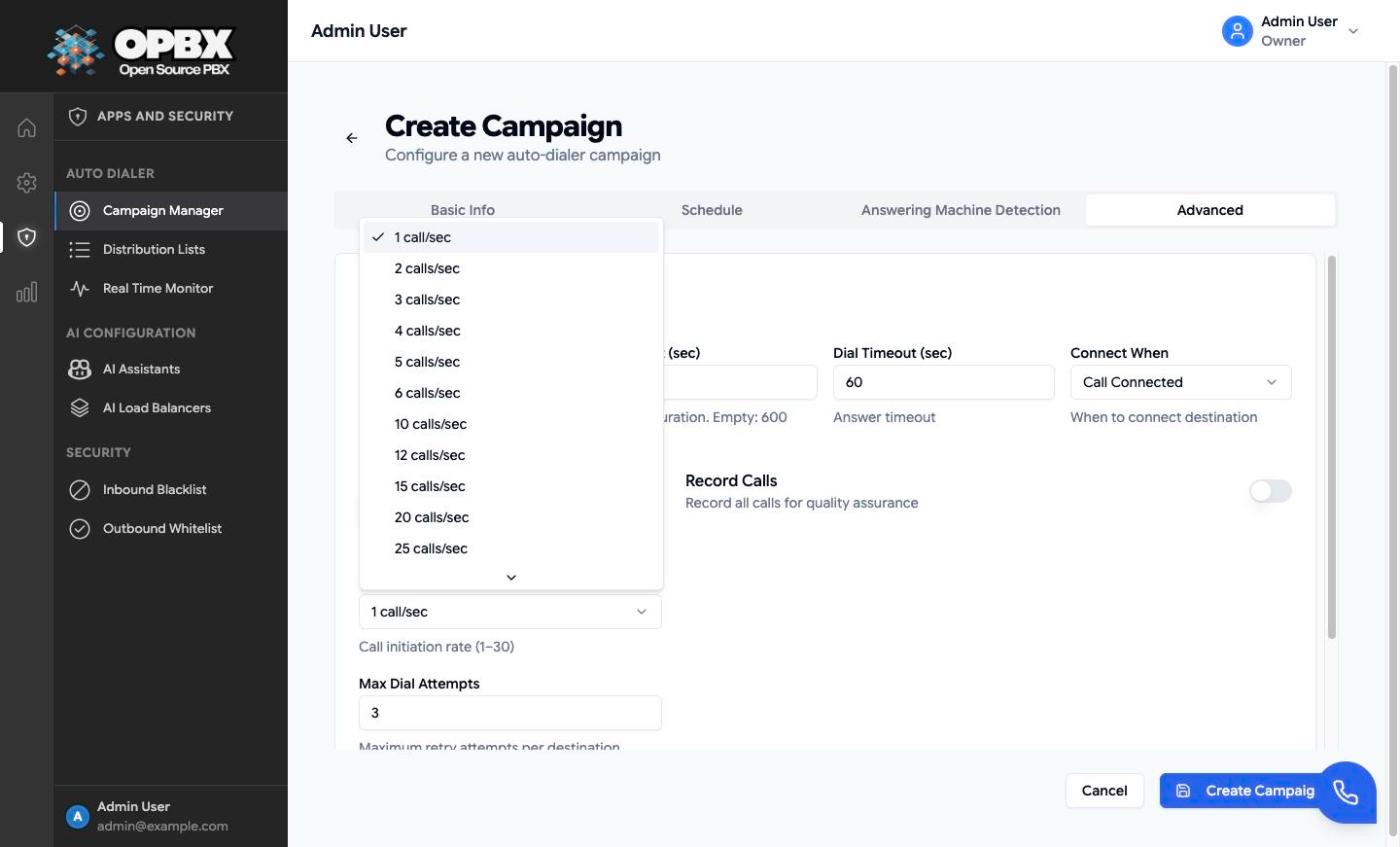
- Enter Concurrent Active Calls (CAC), pick Calls Per Second (CPS) and enter Max Dial Attempts.
- Optionally switch on Retry on busy / no-answer and set First retry delay (minutes).
- Click Update Campaign (or Create Campaign).
Result: the toast "Campaign updated successfully" (or "Campaign created successfully") appears. The dialer worker uses the new limits from its next poll.
Fields
| Field | Limits and default | Meaning |
|---|---|---|
| Concurrent Active Calls (CAC) | 1 to 50. Default: 1 | Most calls of this campaign in progress at the same time |
| Calls Per Second (CPS) | 1, 2, 3, 4, 5, 6, 10, 12, 15, 20, 25 or 30 (the API accepts 1 to 30). Default: 1 | Fastest rate at which new calls start. 2 CPS means at least 500 ms between call starts |
| Max Dial Attempts | 1 to 5. Default: 1 | Most attempts per number, retries included |
| Retry on busy / no-answer | Off by default | Redial busy and unanswered numbers while attempts remain |
| First retry delay (minutes) | 1 to 1440. Default: 15 | Wait before the first redial; each further one waits twice as long, up to 24 hours |
How the limits work together
Every poll (every 10 seconds by default), the dialer worker handles each runnable campaign like this:
- Batch size = CPS × poll interval in seconds, but never more than CAC. With the default 10-second poll: CPS 1 and CAC 3 gives a batch of 3; CPS 5 and CAC 50 gives 50.
- It fetches up to that many pending numbers whose attempts are below Max Dial Attempts and whose retry time (if any) has passed, oldest first.
- Before each call it reserves a CAC slot. If the campaign already has CAC calls in progress, the number waits for a later poll.
- Between call starts it waits at least 1000 ÷ CPS milliseconds.
- A slot is released when Cloudonix reports that the call ended, or straight away if the call could not be placed.
So CAC limits load and CPS limits speed. With long calls, CAC is reached quickly and the campaign dials only as fast as calls finish. With short calls or many unanswered numbers, CPS and the 10-second poll set the pace.
| CAC | CPS | Behaviour |
|---|---|---|
| 1 | 1 | One call at a time. Good for a first test |
| 10 | 1 | Up to 10 calls, started at most one per second |
| 5 | 10 | Five calls start within about half a second, then nothing until calls end |
| 50 | 5 | Up to 50 per poll, five per second: about 10 seconds to fill |
Keeping the count right
OPBX keeps the count of calls in progress for each campaign:
- It is reset to zero when the campaign is started, paused or resumed.
- It goes down when Cloudonix reports that a call ended.
- Every minute a reconciliation job corrects it against the calls OPBX knows to be in progress, so a missed or duplicate report cannot block a campaign for long.
The dialer worker runs as a single replica; the CPS pacing is kept inside that one process. Do not scale it out. See Dialer Worker.
One worker processes at most 10 campaigns at the same time. OPBX accepts at most DIALER_WORKER_RATE_LIMIT worker requests per minute (default 1000). If OPBX answers HTTP 429, the worker waits the Retry-After time (5 minutes when none is given) and skips the rest of that campaign's batch.
Attempts and retries
Each call to a number counts as one attempt. A number is dialed again only while its attempts are below Max Dial Attempts.
| Situation | What happens |
|---|---|
| Cloudonix refuses to place the call | The number goes back to pending and is retried after 1 minute, then 2 minutes. After 3 consecutive refusals it is marked Failed. Each refusal also uses an attempt, so the number fails earlier when Max Dial Attempts is reached |
| Voicemail detected and Retry on Voicemail is on | The number goes back to pending with a delay of 5, 10, 20, then 40 minutes (doubling with each attempt, capped at 60 minutes), while attempts remain. See Answering Machine Detection |
| The call was answered | The number is Completed |
| Busy or no answer | With Retry on busy / no-answer on and attempts left, the number goes back to pending after the campaign's First retry delay (default 15 minutes), and each further retry waits twice as long as the one before (15, 30, 60, 120 ... minutes), up to 24 hours. Otherwise it is Failed |
| Failed, cancelled, congestion or a result OPBX does not recognise | The number is Failed. These are never retried |
To call failed numbers again, select them on the list's detail page and use Reset Dial Attempts (see Reset dial attempts), or copy the list.
On a retry, the dialer prefers a caller ID from the pool that has not been tried for that number yet.
Choosing values
- Start small. CAC 1, CPS 1, one test list of a few of your own numbers.
- Match the destination. Set CAC no higher than the number of simultaneous calls your AI assistant or load balancer can handle.
- Respect the carrier. Keep CPS within what your trunk allows.
- Watch the monitor. CAC utilization near 100 % with callers waiting means the destination is the bottleneck; low utilization with pending numbers means CPS or the schedule is.
Troubleshooting
| Symptom | Likely cause | What to do |
|---|---|---|
| Campaign is Running but nothing is dialed | Outside the schedule; no pending numbers; CAC full | Check the schedule and the list; see the monitor's Active Calls and CAC Utilization |
| Active calls stays at the CAC limit with no calls in progress | Ended calls were not reported yet | Wait for the per-minute reconciliation, or pause and resume (resets the count) |
| Numbers stay pending | Their retry time has not passed, or attempts reached the maximum | Check the number's attempts and last result on the list's detail page |