Answering Machine Detection
Answering machine detection (AMD) tells a campaign whether a call reached a voicemail box. OPBX streams the first seconds of each answered call to its AMD worker, which listens for the voicemail beep. The campaign then hangs up or carries on, according to the actions you set.
Purpose
Use AMD to avoid spending an AI conversation on voicemail boxes, to count how many calls reached voicemail, and (optionally) to try those numbers again later.
Prerequisites
- The AMD worker is running and reachable by Cloudonix through your public address (path
/ws/amd/). See AMD Worker. - The stream address is built from the organization's Cloudonix webhook base URL (or
APP_URLwhen it is empty), withhttpsturned intowss. That address must reach your Nginx from the internet. - A campaign in Draft or Paused status. See Campaign Manager.
Turn detection on
Who can do this: Owner and PBX Admin.
- Open Auto Dialer → Campaign Manager. Pause the campaign if it is Running.
- Click Edit on the campaign (or Create Campaign for a new one) and select the Answering Machine Detection tab.
- Switch on Enable Detection. The actions are filled with the defaults below.
- Set If Voicemail Detected, If Human Detected and If Detection Unclear to Hang up or Continue to destination.
- Optionally switch on Retry on Voicemail ("Auto-retry if voicemail detected"). Retries also need Max Dial Attempts above 1 on the Advanced tab.
- Keep Connect When on Call Connected (Advanced tab).
- Click Update Campaign (or Create Campaign).
Result: the toast "Campaign updated successfully" (or "Campaign created successfully") appears. The detail page lists the Voicemail Action, Human Action, Unknown Action and Retry on Voicemail values. Calls placed from now on stream their audio to the AMD worker.
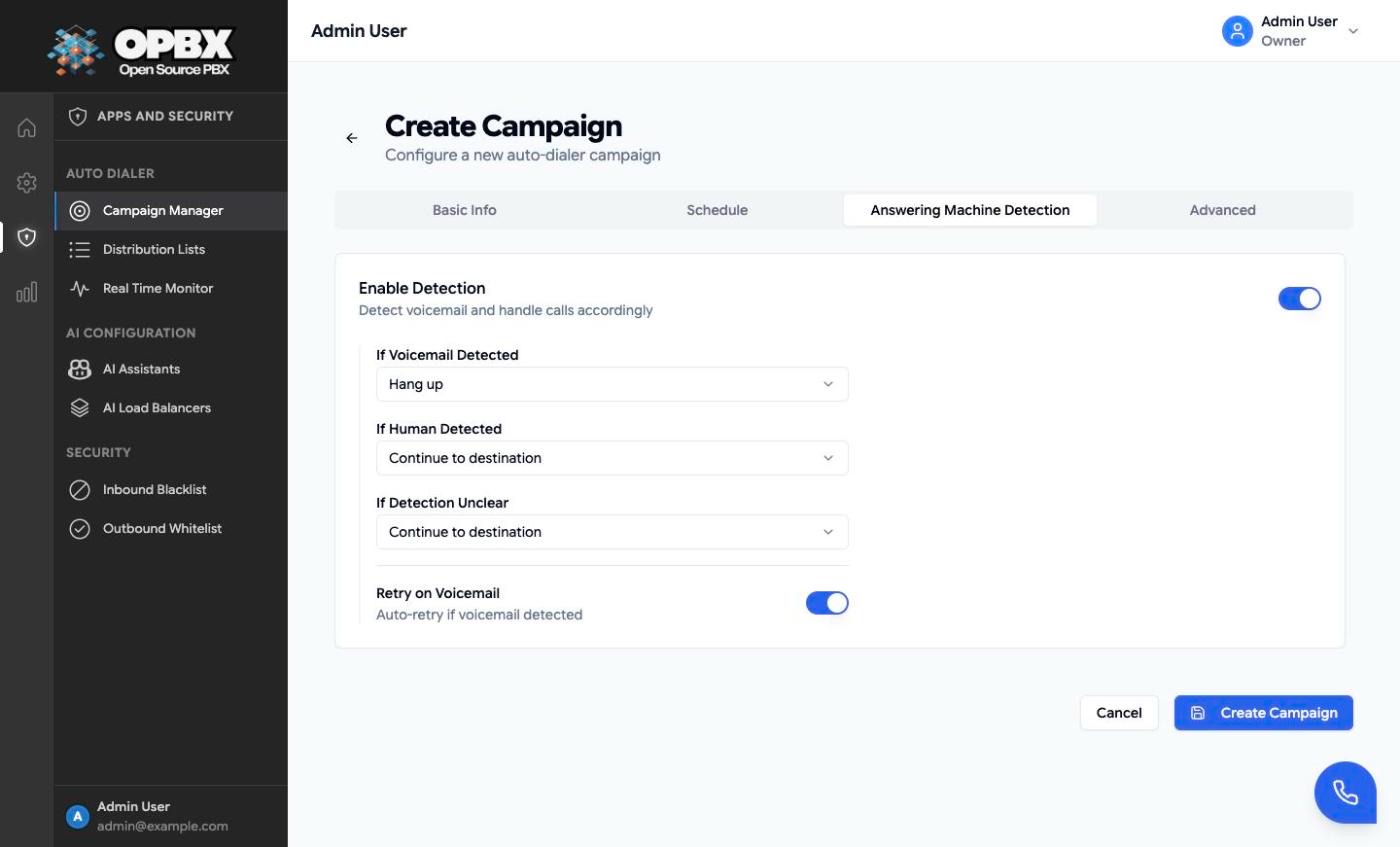
Fields
| Field | Choices | Default when you switch detection on | Applied when |
|---|---|---|---|
| If Voicemail Detected | Hang up, Continue to destination | Hang up | A beep is heard |
| If Human Detected | Hang up, Continue to destination | Continue to destination | Not reported by the current detector (see below) |
| If Detection Unclear | Hang up, Continue to destination | Continue to destination | No beep within the detection window |
| Retry on Voicemail | On or off | Off | A beep is heard and the number has attempts left |
An action left empty (possible through the API) is treated as Hang up, as the form shows it. Only an explicit Continue to destination keeps the call going.
What happens on a call
- The callee answers. Cloudonix connects the call to the campaign's routing destination and at the same time starts streaming the callee's audio to the AMD worker. Detection does not delay the conversation.
- The AMD worker accepts the stream only if it belongs to a known, active auto-dialer call. Any other stream is closed.
- The worker listens for a beep. Two detectors run side by side: a trained model (
beep_ml) and an energy-based tone detector that looks for a steady tone between 300 and 1000 Hz. The tone detector ignores a tone that starts in the first 2 seconds of the stream, because voicemail beeps come after a greeting and a tone at answer time is usually ringback or line noise. - The first verdict wins, and there is exactly one per call:
- Voicemail: a beep was heard.
- Unknown: no beep within the detection window (30 seconds by default).
- OPBX looks up the action on the campaign (never from the worker's message), records the result on the call, and:
- Hang up: ends the call through Cloudonix.
- Continue: does nothing; the conversation goes on.
Timings are set on the AMD worker: AMD_DEFAULT_TIMEOUT_SECONDS (default 30) and AMD_MIN_BEEP_START_MS (default 2000). The standard compose file passes AMD_MIN_BEEP_START_MS from .env but not AMD_DEFAULT_TIMEOUT_SECONDS. See AMD Worker.
The current detector only listens for a beep. It never reports Human, so If Human Detected has no effect. A call answered by a person ends with Unknown when the detection window closes. The form defaults If Detection Unclear to Continue to destination, so live conversations carry on. If you set it to Hang up, every call that does not reach a voicemail is hung up after about 30 seconds, including live conversations. Campaigns saved earlier keep the value they were saved with.
Retry on Voicemail
When a beep is heard, Retry on Voicemail is on and the number still has attempts left (see Max Dial Attempts on the Advanced tab), the number goes back to pending and is retried after 5 minutes, then 10, 20 and 40 minutes (the wait doubles with each attempt), and never waits more than 60 minutes: from the fifth attempt on, every retry is 60 minutes apart. The attempt still counts. When the attempts are used up, the number is closed according to the call's outcome, normally Completed because the voicemail box answered.
Where the result appears
| Place | What you see |
|---|---|
| Campaign detail page | The Voicemail card counts calls where a beep was heard |
| Real-Time Monitor | Voicemail on each campaign card and Voicemail Detected in the drill-down |
| Call Logs | The AMD Status column on each call |
| List detail page | The number's last result |
Turn detection off
Who can do this: Owner and PBX Admin.
- Pause the campaign if it is Running, then click Edit and select the Answering Machine Detection tab.
- Switch off Enable Detection. The action fields disappear.
- Click Update Campaign.
Result: the toast "Campaign updated successfully" appears. The saved actions and Retry on Voicemail are cleared, the detail page shows AMD "Not configured", and new calls are placed without the audio stream. Through the API, set action_voicemail, action_human and action_unknown to null.
Troubleshooting
| Symptom | Likely cause | What to do |
|---|---|---|
| Live calls end after about 30 seconds | If Detection Unclear is Hang up or empty (older campaigns, set by hand, or action_unknown left out in the API) | Set it to Continue to destination |
| Voicemail is never detected | The AMD worker is down, or the webhook base URL (or APP_URL) does not reach Nginx from the internet | Check the worker's health and the Cloudonix settings |
| A real beep is missed | The beep came within the first 2 seconds, or the greeting was longer than the window | Raise AMD_DEFAULT_TIMEOUT_SECONDS (add it to the amd-worker environment in the compose file); lower AMD_MIN_BEEP_START_MS with care |
| Calls are hung up on a ringback or tone at answer | A steady tone after the 2-second gate | Raise AMD_MIN_BEEP_START_MS |
Related pages
- Campaign Manager
- Rate Limiting — attempts and retries
- AMD Worker — configuration and operation
- Call Logs — the AMD Status column