LiveKit SIP Trunking
Using Live Dashboard
LiveKit is an open-source platform for building real-time audio and video applications using WebRTC, supporting both self-hosted and cloud-managed deployments. It provides the infrastructure for applications like video conferencing, telehealth, and live streaming, while also offering an AI framework called LiveKit Agents for creating real-time voice and multimodal AI experiences. The platform is designed to be scalable, reliable, and customizable for developers.
Now, LiveKit is mostly used by developers who are seeking to build their own SaaS applications (or SaaS like). This means, that for every project you create, LiveKit will assign you with a new SIP URI to use. To provision this SIP URI as a service provider in Cloudonix, just open a ticket in our Discord support channel.
Your LiveKit SIP URI
After creatig your project, from the left menu select Telephony->Configuration, the following screen will appear:
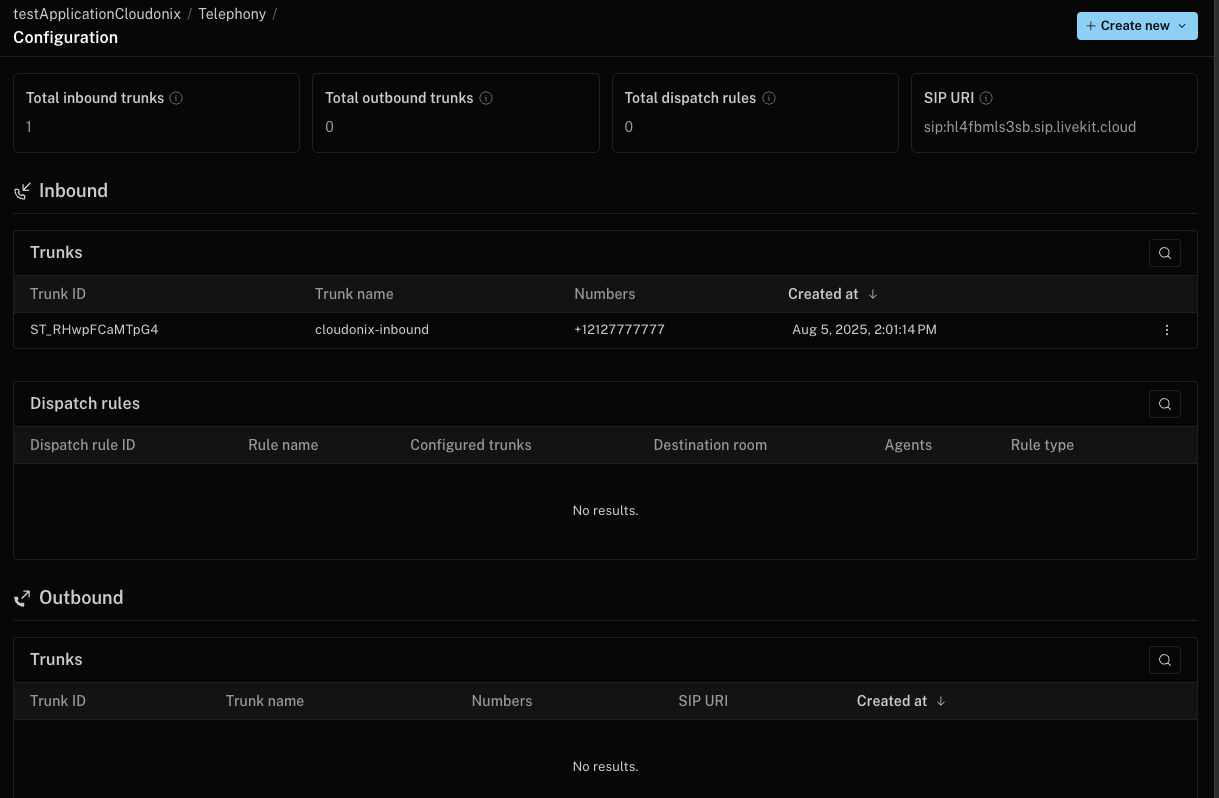
Pay attention to the box, located in the top right corner:

This is the LiveKit assigned SIP URI. Once obtained, login to the Cloudonix Discord and open a support ticket to enable a new LiveKit based service provider. Provide the SIP URI and the name/alias to assign. We will normally open a new service provider within 24-48 hours.
Voice Application Usage
To route inbound calls to your LiveKit project, you will need to use the <Dial><Service> voice application verb. Here is a small example:
<Response>
  <Dial>
    <Service provider="your_request_livekit_alias">+12127773456</Service>
  </Dial>
</Response>